
The Social History Archive offers several ways to search records. Choosing the right starting point depends on what you already know and what you are trying to discover.
How you begin searching in The Social History Archive should be guided by what you already know and what you are trying to achieve. The platform offers multiple search routes because different research questions benefit from different approaches. Understanding when to explore broadly and when to narrow quickly will improve both accuracy and discovery.
All record sets
-
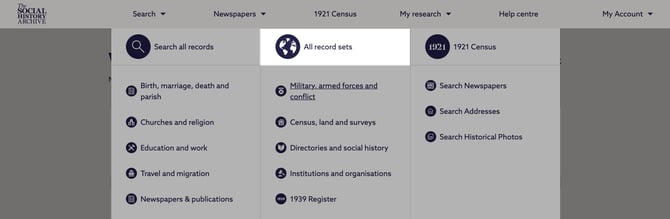
Use All record sets search when you want to explore the full breadth of the Archive or when you already know the specific record set you wish to search. This approach is particularly effective for researchers working within a known source type or series.
-
From the All record sets list, you can either browse the complete collection or use the search bar to type a record set name or topic. As you type, relevant record sets are suggested automatically, allowing you to move quickly from exploration to targeted searching.
-
You can narrow the list of record sets by keyword, location, and date range. This is useful when you know the general period or geography but are still deciding which sources are most appropriate.
-
Selecting a record set takes you to its dedicated search page, which often includes search fields unique to that record set.
-
For example, selecting the 1921 Census for England and Wales opens a search form that includes census‑specific fields such as occupation and employer. Using these fields can significantly improve precision compared with a general keyword search.
Search all records
-
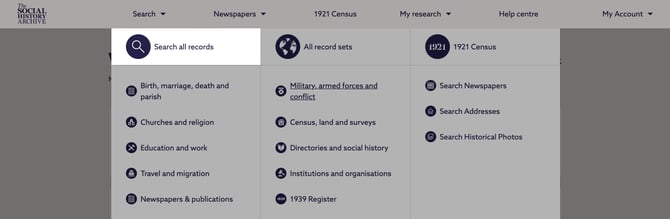
Use Search All Records when you are researching individuals or events and want to search across multiple record types at once. This approach is best suited when you have names, approximate dates, or places, but are unsure which specific records may contain relevant information.
-
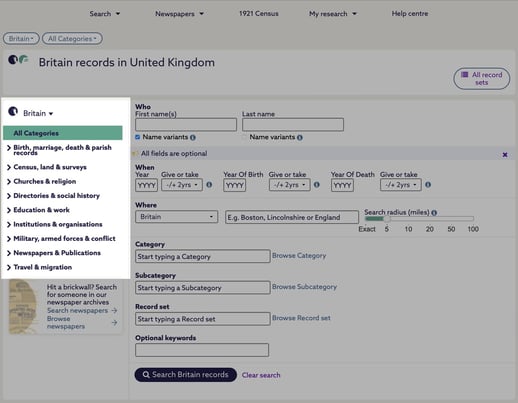
From an all‑records search, you can narrow results using the category menu on the left‑hand side. Categories such as Birth, Marriage, Death & Parish Records allow you to progressively limit your search while still retaining cross‑collection visibility.
-
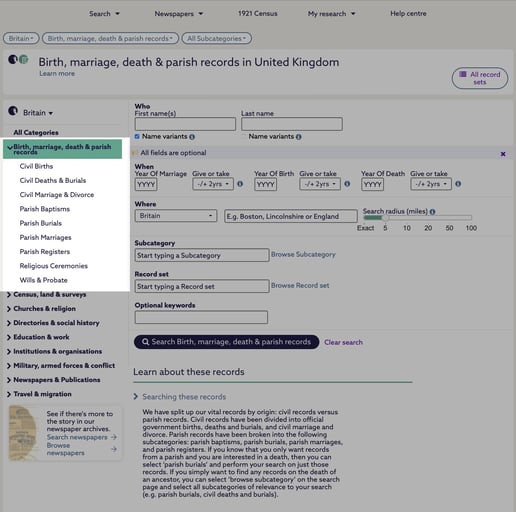
You can refine further into record‑specific searches, such as Civil Births, if your research question becomes more focused. Selecting Browse Record Set within a sub‑category allows you to see which record sets are included, helping you assess the record sets available relevant to that theme.
-
This route balances recall and discovery, but may surface more results than you need. Refinement through filters is often essential.
Category Search
-
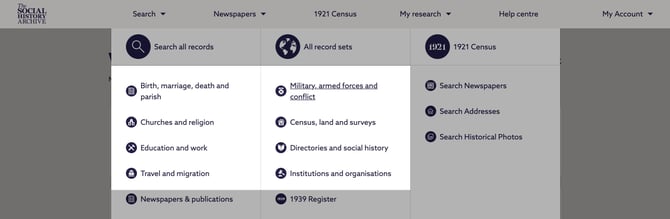
Use Category Search when you already know the type of record you are looking for, such as census returns, land records, or surveys. This approach narrows the search space from the outset and is especially effective for structured academic research.
-
You can access record categories via the Search option in the main menu once logged in. Selecting a category takes you to a dedicated search page covering all record sets within that category.
-
After running a search, filters allow you to refine results by sub‑category, date, or location, or to move quickly between related categories. This method supports controlled comparison across similar sources while maintaining consistency in record type.
Viewing Records

-
Search results include icons on the right‑hand side that allow you to view either the record transcript or, where available, the original image.
-
Transcripts are typed representations of the original records and typically surface the most important indexed information, making them efficient for initial analysis.
-
Images are high‑resolution digitised versions of the original documents. Not all records include images, but when they are available, it is recommended to review them. Images often contain additional context, marginal notes, or errors not captured in transcripts.
-
A red tick on the transcript or image icon indicates that you have already viewed that item, helping you track your research progress.